
Is the iPhone SE (2020) Still a Good Value Phone in 2026? | CoderClick Review

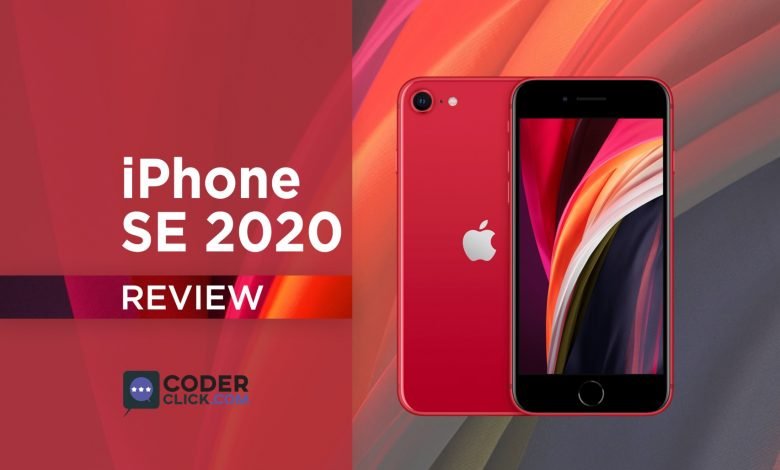
Updated for 2026: Originally published in 2020, this review has been refreshed to reflect the iPhone SE (2020)’s standing in today’s tech landscape.
Since its launch, Apple products (especially the iPhone ones) have always been on the premium slot along with a huge price tag for the mass people. But, the pressure from Android giants like Xiaomi, Huawei, Samsung, or even Google’s Pixel devices has made them realize that they need to step up into the game. There had been ongoing rumors about a budget-friendly iPhone device for a long time, but when Apple officially announced the new iPhone SE (2020) back in April 2020, it got many excited (by a lot !!!).
In this post, we’re going to have a more in-depth look at the iPhone SE (2020) review (Don’t get confused with the iPhone SE 2016) and see how much it stacks up over its Android counterparts, especially considering its current availability and pricing, which is now significantly lower than its original $399 launch price.
The iPhone SE (2020) Review in 2026
The Unboxing of iPhone SE (2020):
The unboxing experience is pretty much “Apple”ish and rather straight forward in my opinion. There aren’t any “little surprises” that many of the mobile phone manufacturers include. The package will have a standard box, some documentations, two Apple logo stickers, the iPhone itself, a sim ejector pin, a power adapter with a lightning cable. I was surprised (even a bit overwhelmed) to find an EarPod with a lightning connector and a bit sad to see they only included a 5W charger brick even though the phone supports up to 18W of fast charging.
I guess some corners had to be cut to compete alongside other brands with its original price tag.

The Design & Build of iPhone SE (2020):
The moment you take out the phone, you will sense the small form factor yet the premium feelings this phone has. It’s been a true marvel in the phone industries how much the sizes of phones have grown in the past 6 years. Even the 5.5-inch display (which, once was thought to be impossible) seems to be on the smaller side of the spectrum nowadays. However, this small size along with a balanced weight distribution will let you have a refreshing change against the current trend.
The body frame is made up of fully recycled aluminium, which was a good thing considering cost, environment as well as weight balancing. The front and back both come with a Gorilla Glass 5 with the front being coated with oleophobic coating and the back with a glossy finish. The phone has a dimension of 138.4 x 67.3 x 7.3 mm; having a weight of only 148g (which is pretty low considering recent years). The phone is rated for IP67 dust and water resistance.
Looking from the front you’ll find the display, the Touch ID. On the upper side, there is an earpiece alongside some sensors and the front-facing camera. The good thing is the earphone can work as a stereo speaker. You wouldn’t be wrong if you think of it as an iPhone 8 due to its shocking similarities (the iPhone 8 was released in 2017, making this design quite old by 2026 standards). The only difference you can make for the white variant where the front glass is now fully black from being just white. Looking at the back, you can find the single-camera solution. How is the performance? You ask. In one word, IT IS GOOD! I’ll be covering more in the camera section, don’t worry. There is a small camera hump though, but it is ever so slight so I don’t think that will be a problem. Also, you’ll see the logo placement has been moved to the center (It was slightly offset to the upper portion in iPhone 8) to match it with the then-recent iPhone releases.
Viewing from the left you’ll find Apple’s signature silent slider button, then volume keys, and the network bands. Viewing from the right, you will have the power button, network bands, and the Simcard slot. The good thing about this is now it has the support for dual nano sim or e-sim which in my opinion is a good touch.

Going back to the front again, you can see this device is sporting a 4.7-inch IPS “Retina” LCD Screen from 2017 with a 16:9 aspect ratio leaving a big chin and forehead. It might be very distracting for most users now that most of us are getting used to an almost bezel-less display nowadays, but it also comes with some advantages like better grip and no accidental touch on the side of the screen. Also, the display will not feature any force touch (replaced by long touch across devices), to cut the pricing probably. The display resolution of 750*1334 pixels which means a PPI density of just above 300. This low resolution on paper might seem a bummer, as most of the Android devices over $200 featured 1080p display even back in 2020. But being Apple, they have given you the best 750p panel out there in my knowledge and I think this was the least of my concern.

Front View – iPhone SE 
Bottom View – iPhone SE 
Right View – iPhone SE 
Left View – iPhone SE


Viewing from any side you will find no headphone jack. No thanks to Apple for removing maybe one of the best inventions from yesterdecade. But it is what it is.
With the introduction of the iPhone SE (2020) edition, we’re once again welcoming our trusty old Touch ID, causing a huge forehead and a huge chin area on the front. But the Touch ID works just as quickly if not better than Face ID, which has not been included.
With the introduction of the iPhone SE (2020) edition, we’re once again welcoming our trusty old Touch ID, causing a huge forehead and a huge chin area on the front. But the Touch ID works just as quickly if not better than Face ID, which has not been included.
iPhone SE (2020) Available on Amazon
As of 2026, the iPhone SE (2020) is no longer sold new by Apple. It can typically be found refurbished or used for around $100–$200, depending on condition and storage.
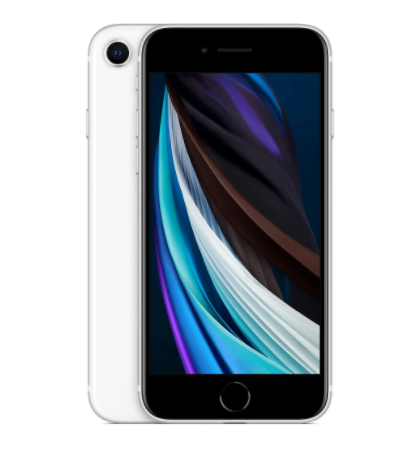
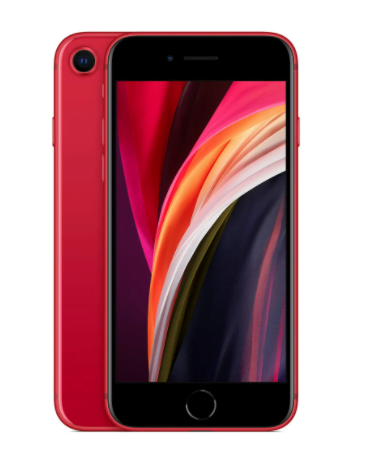
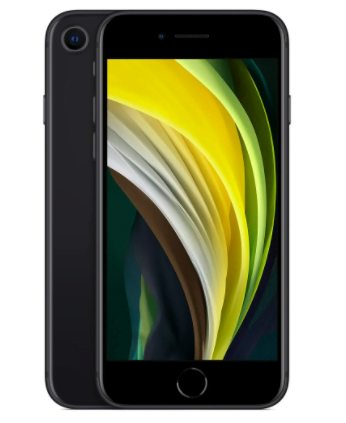
The Internals of iPhone SE (2020):
As similar as it might look like its older sibling, the iPhone 8 from 2017, the similarity ends with the internals. The internal was renewed with an Apple A13 Bionic SOC, a flagship chipset from 2019 which was also used on the iPhone 11. While still capable for basic tasks in 2026, it’s now a 7-year-old chip.
Just take a quick look at all the specs:
| Chipset | Apple A13 Bionic (Built on 7nm+ Technology) |
| CPU | Hexa-core (2 Powerful 2.65GHz + 4 Efficient 1.8GHz cores) |
| GPU | Apple 4 Core GPU |
| Sim & Memory Card Slot | Dual Sim Support (With nano and e-sim) Memory card slot Not available |
| Internals | 3 variants. 64GB, 128GB, 256GB all with 3GB ram |
| Smart Assistant | Siri |
| Connectivity | Bluetooth: 5.0, A2DP Wi-Fi: 802.11 a/b/g/n/ac, Dual-band & Hotspot SupportGPS : A-GPS/ GLONASS/GALILEOOthers: NFC Support, No Radio |
| Sensors | gyroscopic, compass, accelerometer, proximity, barometric |
| USB Connection | 2.0 With Lighting Connector |
The Speakers speak for themselves. Even most of the 6’’ Androids didn’t sound as good as them at the time. Cellular reception was also good. Our main complaint was the battery though, which is only 1821 mAh. This is significantly below standard nowadays as 2500mAh is the bare minimum benchmark in the industry, and many phones now exceed 4000mAh. But, this thing supports fast charging. Apple claimed 50% of full charge within 30mins. And this has got support for wireless charging too so charging over any Starbucks breakfast is possible.
The Performance of iPhone SE (2020):
Benchmark Scores
Even though the bench-marking score doesn’t represent the real-life performance or experience, but it gives an idea and comparison with other devices about how powerful this chipset was both in terms of CPU, GPU & Storage. We’ve used some benchmarking tools and the results are pretty much like below. Also, we’re including the iPhone SE (2020), iPhone SE 2016, and Google’s Pixel 3a for comparison. Have a look:
| Devices | Antutu Benchmark |
| iPhone SE (2020) | 465,000 (Version 8.1.0) |
| iPhone SE 2016 | 170,000 (Version 8.1.0) |
| Pixel 3a | 180,000 (Version 7.1.0) |
Judging by the scores we can see that iPhone SE (2020) was approximately 3 times faster than Google Pixel 3a (released 2019, the 2026 successor may be worth considering) or iPhone SE 2016 model. But the overall experience depends on software and hardware optimization more than raw processing power, which Apple is renowned for.
Day to Day Performance of iPhone SE (2020)
The day to day performance of the iPhone SE (2020) was very good at launch. All the horsepower from the A13 Bionic chip and 3GB of RAM just blazes through the iOS versions it supports. Currently, no software platform is as optimized as iOS thanks to Apple’s dedication and partly its marketing strategy to not flooding the market with thousands of devices every year. One thing Apple does superbly is their updating scheme. While the 2016-launched iPhone SE received updates for many years, the iPhone SE (2020) has likely reached the end of its major iOS update cycle by 2026, meaning it will continue to receive security patches but not new feature updates.
Gaming Performance of iPhone SE (2020)
Again the A13 Bionic comes to rescue and the gameplay is still buttery smooth for many older titles and less demanding new ones. Too bad that the screen can’t fully utilize all the raw power from the chipset and there is still some headroom left. But the battery life takes a big hit and you’ll not be able to do any gaming more than 3-4hrs straight.
Heating and Thermals
The phone stayed cool most of the time and only became slightly warm after a long heavy gaming session.
Battery Life of iPhone SE (2020)
Just like stated earlier, the battery life is mediocre and you’ll likely need to charge the device by the end of every day under moderate use, especially as the battery ages. However, the standby time is outstanding, much to be expected from Apple. Its standby time was around 20-30% higher than the iPhone 8 due to its newer power-efficient A13 chip which is built on a 7nm+ node.
The Camera of iPhone SE (2020):
The iPhone SE (2020) features a single back Camera having 12 megapixels and a single front camera with 7MP. Don’t get fooled by the numbers though, as this camera was one of the best we’d seen from any Android (even those having 64MP or so) we had seen at its original price range. This camera is exactly the same as the iPhone 8 (or the iPhone XR) unit with a superior Image processing algorithm from iPhone 11. So, It acts more like a hybrid camera system. As expected, It produced a better image quality than the iPhone XR but lacked behind the triple camera setup from the iPhone 11 only by a few margins though. While still capable for casual photos, it cannot compete with modern smartphone cameras in 2026.
Daylight Photo
They are sharp, with good HDR, Color Accuracy, is not good though as it doesn’t have a Zoom lens, and its more than good for uploading your social media photos.


Low-light Photo
Due to an older camera than the iPhone 11, the low light photo is good but not as crisp as expected. Then again, you can’t complain much for a phone of this age.
Extreme Dark Photo
Still, no dedicated Night Mode is present in 2026, so don’t expect much from extreme dark photos.

Portrait Mode
As it’s a single camera system, there is no depth sensor, so the images are purely dependent on software to make the bokeh, which works most of the time (95% in my opinion) but there are times when some fringing issue occurs. Also, there is no chance of taking object portrait photos due to the lack of that depth sensor.

Video Mode of iPhone SE (2020)
Apple has always been the king when it comes to video mode, and this iPhone SE (2020) didn’t disappoint at launch. It can record videos up to 4k @ 60fps, 30fps and 24fps for that cinematic effect. Not to mention the awesome optical video Stabilization feature and smart HDR to bring out the tiniest details from the shadows. The slow-motion capabilities are also great at 120fps and 240fps @ 1080p. Furthermore, you can record stereo sound with it.
I’m attaching a video made by Arun from Mrwhosetheboss where he has given you a complete idea about the camera and made and wonderful comparison with its siblings.
The Goods & The Bads of iPhone SE (2020)
Now that we’ve come to the end of the review, there are some key points to be made to sum it all up. So here are the goods & the bads respectively, considering its age in 2026:
The Goods
- Still offers a great in-hand experience for those who prefer small phones.
- Once flagship-level performance, still capable for basic tasks and many apps in 2026.
- Was arguably one of the best cameras in its price segment at launch, still decent for casual photos.
- Tested & reliable Apple ecosystem.
- Historically good software support by Apple, though major iOS updates have likely ceased.
- Good Standby time.
The Bads
- No Face ID (but makes up with the Touch ID).
- Low-resolution 16:9 display with No AMOLED, very dated by 2026 standards.
- Very old design.
- Battery life is poor for heavy usage, and likely degraded further with age.
- No 3D touch.
- No headphone jack.
Actually there are so many good things to say for this phone to say the bad ones just fade away pretty quickly.
Final Thoughts:
Why (and how) This Phone Exists?

This phone was very unlikely of the Apple we used to know. But, this meant that the industry was forcing them to change to work in favor of us, the end clients. The main reason for this phone to exist was market competition. Apple had been losing a huge chunk of the population like college students or small-time moneymakers who just didn’t have the money to go for the premium. Not to mention there is a huge audience (mostly elderly people who just can’t handle the big sized phones). So, I think this was a smart move by Apple at the time.
One thing to point out they managed to keep this price low by cutting off the R&D investment and repurposing the old hardware. Only a company like Apple can pull off these kinds of moves.
Similar competitors in the segment (Pixel 3a, Xiaomi, Huawei, and even the iPhone 8 refurbished)
There were still other options in this segment to go with like Pixel 3a (released 2019, the 2026 successor may be worth considering), Xiaomi Mi Note 10 Lite (released 2020, the 2026 successor may be worth considering), Samsung Galaxy S10e (released 2019, the 2026 successor may be worth considering), etc. or even the iPhone 8 (released 2017, the 2026 successor may be worth considering) which went around $300 from 3rd party seller. For a truly modern budget iPhone, the iPhone SE (3rd Gen, 2022) is the current option.
Should You Get iPhone SE (2020)?
In 2026, the iPhone SE (2020) is a niche device. If you are someone who is using a really old iPhone (like the 6s or 7) and wants to move up to a slightly newer, but still compact, iOS experience on an extreme budget, this might be a consideration, especially if you find a well-maintained refurbished unit. Or, If you’re someone who just needs a secondary device for basic communication and specific iOS apps, and don’t want to spend a lot of money, this could be a go-to device for you. However, be prepared for a dated design, limited battery life, and no further major iOS updates.
If the Apple ecosystem doesn’t bother you anyway, my suggestion is to consider newer budget Android phones or the more recent iPhone SE (3rd Gen, 2022) for a better overall experience and longer software support.
But, all things considered, the iPhone SE (2020) was one of the best phones for all the average Joe out there at its original price point. Hope you have enjoyed our iPhone SE (2020) review.
Also, if you are interested in Leather iPhone Case, have a look at this Leather iPhone Case Buying Guide
You Might Also Like:
- iPhone SE vs Google Pixel 3a || Make The Right Buy
- Cloud Gaming: The Future is Here!
- iPad, Which One You Choose || A Complete Buyers Guide (2026 Edition).
iPhone SE (2020) in 2026: A Dated, Budget Apple Pick
Build Quality - 7.8
Performance - 6.2
Display - 6.5
Battery Life - 4.5
Value for Money - 7.2
6.4
Fair
In 2026, the iPhone SE (2020) offers a premium build and basic performance for its now very low price. However, its display, battery life, and overall design are significantly dated, making it a fair choice only for budget-conscious users needing an entry into the Apple ecosystem.



But man android is always better. Cant afford to sell my both kidneys !