

From dawn to dusk, watches are the best all day long companion to us. And Samsung watches are the trendiest wearable for your workout or in styling. Isn’t it?
Updated for 2026: This guide has been refreshed to provide the most current information and product recommendations for charging your Samsung Watch without its dedicated charger.
But for losing or forgetting to carry a charger, your watch can cause running out of battery in an urgent situation. As a Samsung Watch user, you must feel the necessity of charging it without a charger most of the time. So if you learn how to charge a watch without a charger in an accurate and superb easy way, you can avoid the sudden shut down of your watch.
In this article, We will share how to charge Samsung watch without charger step by step. So let’s take a look further.
Check on How to Charge Samsung Watch without Charger
Before going to the without charger charging method we suggest you buy the alternative wireless charger or charging dock this will be the healthy solution for your beloved watch.
Also, Discover how to charge Samsung Galaxy Watch 3 (a model from 2020, the 2026 successor may be worth considering) and clear the confusion of how to charge Samsung watch without any worry. Along with that to buy some matching watchbands go through this content as well “7 Best Samsung Galaxy Watch 3 Bands (though newer watch models are available, many of these bands remain compatible) For Attractive Look”.
#Way 1: Purchase a Wireless Charging Dock or Charging Cable
If you lost or spoiled your original Samsung watch charger or facing difficulties using it, then purchasing a wireless charging dock or a charging cable can be your absolute solution.
With a wireless charging dock, you can charge your Samsung watch at any place effortlessly, like your office, University, gym, or even on a trip. You can choose among the one of them which is compatible with your watch model. First, let’s know how you can use your new charging dock to charge your watch.
- Take the USB cable and plug it in the back part of your wireless charging dock.
- Find any near adapter or electric socket and port the larger end of the cable into the adapter.
- Place the watches back against the charging dock, aligning the watch center with the wireless charging dock’s center.
- Make sure your watch is connected well and charged. There is a LED light behind the Samsung watch. If you see, the LED indicates orange light, which means the adapter you’re using for charging may not be able to draw maximum power. So your watch will take a long time to charge.
- When your Samsung watch is ultimately charged, it will turn Green from Red. And when you notice that the
Samsung galaxy watch charger blinking red then you can disconnect it from the charging dock.
Best Alternatives of Original Samsung Galaxy Watch Charger
First, I’ll recommend to you some of the best alternatives to the original Samsung watch charger. Hopefully, that will help you not worry about where to plug your charger in an unsuitable place.
Recommendations | Compatible with | Reason to Buy |
Samsung Official Wireless Charger 
| Samsung Galaxy Watch (released 2018, the 2026 successor may be worth considering) & Watch Active 2 (released 2019, the 2026 successor may be worth considering) | Key Features
|
Galaxy watch wireless charging dock
| New Samsung Galaxy Watch 42mm/46mm, Samsung Galaxy Watch SM-R800/R810/R815 (models from 2018, the 2026 successor may be worth considering) | Key Features
|
| Samsung Galaxy Smart Watch 42mm 46mm, Samsung Galaxy Smart Watch SM-R800 SM-R810 SM-R815 (models from 2018, the 2026 successor may be worth considering) | Key Features
|
| Samsung Galaxy Smartwatch Gear S3 Frontier (SM-R760 / SM-R765) / S3 Classic (SM-R770) (models from 2016, the 2026 successor may be worth considering), Samsung Galaxy Watch 46mm (SM-R800 / SM-R805) / Samsung Galaxy Watch 42mm (SM-R810) (models from 2018, the 2026 successor may be worth considering) | Key Features
|


# Way 2: Purchase Wireless Chargers for Your Samsung Watch
Other than that, you guys can go through the wireless chargers. Samsung has its own wireless charger where with one charger you can charge your Watches, Buds, Galaxy Phones, and Apple iPhones.
Samsung Wireless Duo Charger Recommendations | Compatible with | Reason to Buy |
Samsung Wireless Fast Charger Duo Pad
| Gear S3 (released 2016), Gear Sport (released 2017), and Galaxy Watch (released 2018), Galaxy S9 (released 2018), Note9 (released 2018) or other compatible Samsung smartphone (including newer models like Galaxy S24, Z Fold 6, etc.), Galaxy Buds (original model, newer generations available) | Key Features
|
Samsung Wireless Charger DUO Pad
| Gear S3 (released 2016), Gear Sport (released 2017), Galaxy Watch (released 2018), Galaxy S9 (released 2018), Note9 (released 2018), Galaxy S10/e/+ (released 2019), Samsung Galaxy S8 (released 2017), Samsung Galaxy Note8 (released 2017), Apple iPhone 8 (released 2017), and Apple iPhone X (released 2017) (consider newer models of all devices as of 2026) | Key Features
|

It is not a good thing to charge any galaxy watch overnight when it is fully charged. If you put it in charge and the watch is still on then it will fluctuate between charging and discharging and that process will harm your watch’s battery. So we suggest when the watch is charged fully disconnect it from the charging dock or cable and do care about the galaxy watch charge time.Is it OK to leave Galaxy Watch charging overnight?
Samsung Wireless Trio Charger Recommendation | Compatible with | Reason to Buy |
Samsung Electronics Wireless Charger Trio
| Galaxy Watch 3 (released 2020), Active 2 (released 2019), Active (released 2019) smartwatches (the 2026 successors may be worth considering), Galaxy Phones (including newer models like Galaxy S24, Z Fold 6, etc.), Buds (newer generations available), Watches, and Apple iPhone Devices (including newer models like iPhone 15/16) | Key Features
|
Samsung Qi Certified Fast Charge Wireless Charger Pad
| Samsung Gear S3 smartwatch (released 2016) or later (the 2026 successor may be worth considering), Galaxy Note10 (released 2019), Note10+ (released 2019), S10 (released 2019), Note9 (released 2018) (consider newer Galaxy phone models as of 2026), Apple iphone8 (released 2017), iPhone x (released 2017), iPhone 11 (released 2019) (consider newer iPhone models as of 2026) | Key Features
|


Here we also recommend some other brands’ budget-friendly wireless chargers, please do check.
Check Battery Status of Your Samsung Watch
Whether you need to charge your watch or not, you can figure out this by checking your watch battery status. For this, go to the setting option and select the battery, and immediately, your battery life will appear on display.
Samsung provided a 1-year warranty for the watch’s charging dock. Besides, it gives an original factory warranty and a 3-month warranty period on the repair. If you lost your original charging dock, you are referred to visit the Samsung support site to find the most compatible dock for your watch.Samsung Support if You have Lost the Original Dock
## Steps to Charge Samsung Watch without Charger
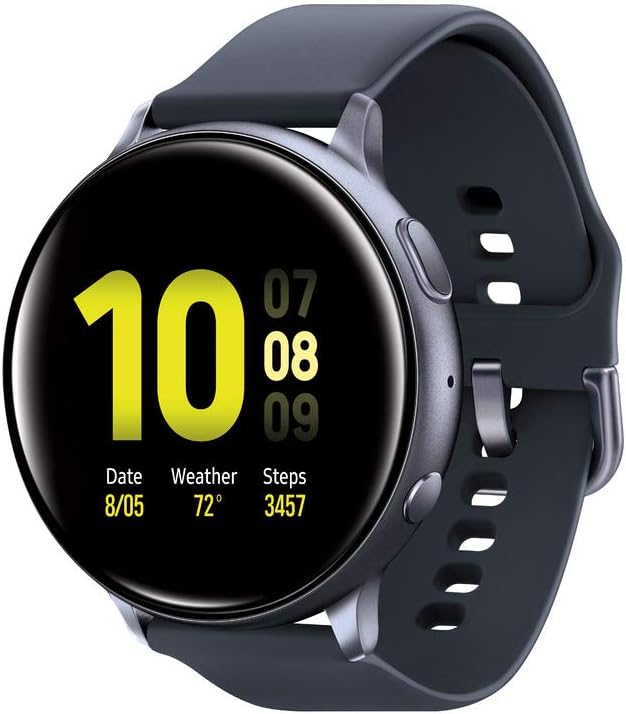 (Image likely features a Samsung Galaxy Watch 3, released 2020; the 2026 successor may be worth considering)
Here we discussed some quick and easy steps to make your charging process easier. These will help you in urgent situations when you can’t access a charger. So let’s take a look at these instructions.
#Method 1: Switch on “Wireless PowerShare” of Samsung Galaxy Phone
This is the best way for you if you’ve got a Samsung Galaxy Phone. Because this phone features a “Wireless PowerShare” option for you to get rid of carrying an extra charger in your pocket. Here we describe the process step by step for you.
This “Wireless PowerShare” feature is available in many Samsung Galaxy Mobiles, including newer models like the Galaxy S21, S22, S23, S24 series, Galaxy Z Flip 3, 4, 5, 6, Galaxy Z Fold 3, 4, 5, 6, as well as older models like the Galaxy Z Flip, Galaxy Z Flip 5G, Galaxy S10 series (released 2019), Galaxy S20 series (released 2020), Galaxy Note10 series (released 2019), Note20 5G (released 2020), and Note20 ultra 5G (released 2020). So you will get two answers in this section of how to charge Samsung Watch with phone or as well as how to charge Samsung Active Watch with phone at the same time. For active watch users, it will be an easy solution to know how to charge Samsung Galaxy Watch Active.
Step 1: Swipe down the top notification bar of your home screen
Swipe down your notification bar on the top of the home screen for quick toggles.
Step 2: Swipe down the bar again
Swipe down the top bar once again to find the wireless power share icon from quick settings.
Step 3: Tap the “Wireless PowerShare” icon
By tapping on the “Wireless PowerShare” from the quick settings will take you to the PowerShare screen.
Step 4: Tap the switch on
On the screen, there will appear an on/off switch for PowerShare. Then turn on the button, and it’s ready to work.
Step 5: Position the Samsung Watch on the Phone
Place your Samsung watch and Samsung Galaxy S10 (or any compatible Galaxy phone) back-to-back so that the charging coils of both devices remain aligned with each other. However, you require extra effort to find the proper line where the charging coils matched one another.
Step 6: Check the Display Message of Charging
If both the devices are aligned accurately and begin to power exchange, there will be a notification of “charging” on your phone display. Also, you’ll see your Samsung watch will be lightened up to show the indication of charging.
Step 7: Turn off the PowerShare if charging is complete.
When your Watch is fully charged, separate the two devices, and that’s all. You don’t need to do any difficult tasks for disconnecting them. The “Wireless PowerShare ” display probably appears again, and you have to turn it off.
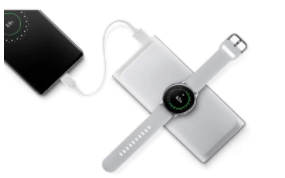
#Method 2: Charge Through a Power Bank
Don’t worry if you’re not a Samsung Galaxy Mobile user. You can also charge through a power bank following the simple steps we discussed here.
Step 1: Activate the Power Bank
Press the button of the power bank to activate it. If the light turns on, it’s ready to use.
Step 2: Place Samsung Watch on the Power bank.
Position your watch back against the backside of the power bank where the charging coil is placed so that both devices could align at that point.
Step 3: Check the Battery Level on Watch
Check the battery status on the display of your Samsung watch. Once it’s fully charged, turn off the button of your Power Bank.
Tips Before You Follow the Methods
Find the Lost Samsung Watch Through the Samsung Wearable App
 (Image likely features a Samsung Galaxy Watch 4 Classic, released 2021; the 2026 successor may be worth considering)
Samsung lets you relax if you lose your favorite Samsung watch. You don’t need to be panic anymore because the Samsung Wearable App will find your watch within a very short time, which is sometimes impossible to do yourself.
Here we discussed the instructions with you to let you know how you can easily find your lost Samsung watch through the app on your mobile. So, check out these steps.
- This feature lets you know the exact location and address of your Samsung watch’s current availability. You can also find it by tapping on the show on the map.
- Reset reactivation lock or remotely set a new wave in your Samsung watch.
1. If you want to track your Samsung watch, you need to pair it with your mobile. 2. If your Samsung watch is not within the Bluetooth range, then the Start feature will not work. 3. Your device must have a data connection mode or connected to Wi-Fi. 4. You need to access it in Remote Connection.Note:
Wrap Up
Not having a watch charger always with us is a common matter. But if you see your watch is shut down when needed in an emergency, it may make you frustrated. So every Samsung watch user must know how to charge the Samsung watch without charger.
That’s why we discussed this article so that you don’t face any difficulties. I expect you have learned everything in detail from our article and must feel fearless now to not always belong to a charger.
Read Out More:
- 7 Best Samsung Galaxy Watch 3 Bands For Attractive Look
- Best Budget Smartwatches with Long Battery Life- Top 5 Picks!
- Smartwatches For More Productivity
- The 5 Best Smartwatch For Kids
- How To Remove Scratches From Apple Watch Screen
- 5 Budget-Friendly But Best Smartwatch For Reminder
- Discover How To Charge Airpods Without Case Effortlessly
Head to Head Comparisons
- Garmin Vs Fitbit Vs Apple Watch Detail Review
- Cloudways Vs Siteground – Which Wins The Battle?
- iPhone 11 vs iPhone 12: Which One Will Meet Your Demands?
- iPad Air vs. iPad Mini: What Will You Select?
- Lenovo Flex vs Ideapad: Which Will be Your Favorite?
- Surface Pro vs Laptop: What will be the Best for You?
Review Articles
Laptop Reviews:
- 7 Best Lenovo Laptop For Students
- Acer Nitro 5 || The best entry-level gaming laptop?
- Dell XPS 13 || Small yet Powerful
- Dell XPS 15 (2020 model, consider newer versions) || Best All-Around Laptop for Professionals
- New Dell XPS 17 (2020 model, consider newer versions) – Ultimate MacBook Pro Replacement??
Phone Reviews:
- iPhone 11 Pro || The King of iPhone !!!
- iPhone 11 || Close to Perfection !!!
- iPhone XR || A Solid Choice !!!
- OnePlus 8 || Flagship Killer to Killer Flagship
- OnePlus 8 Pro|| One Step Closer !!!
- OnePlus Nord || Good Buy, Tough Sell
- MotorolOnePlus 8 Pro|| One Step Closer !!!a Edge Review & User Opinions